Travel Tips · Payments
Pay by Phone, Keep a Backup
Set up Alipay and Weixin Pay, link an eligible bank card, learn both QR-payment methods, and prepare cash and card backups.
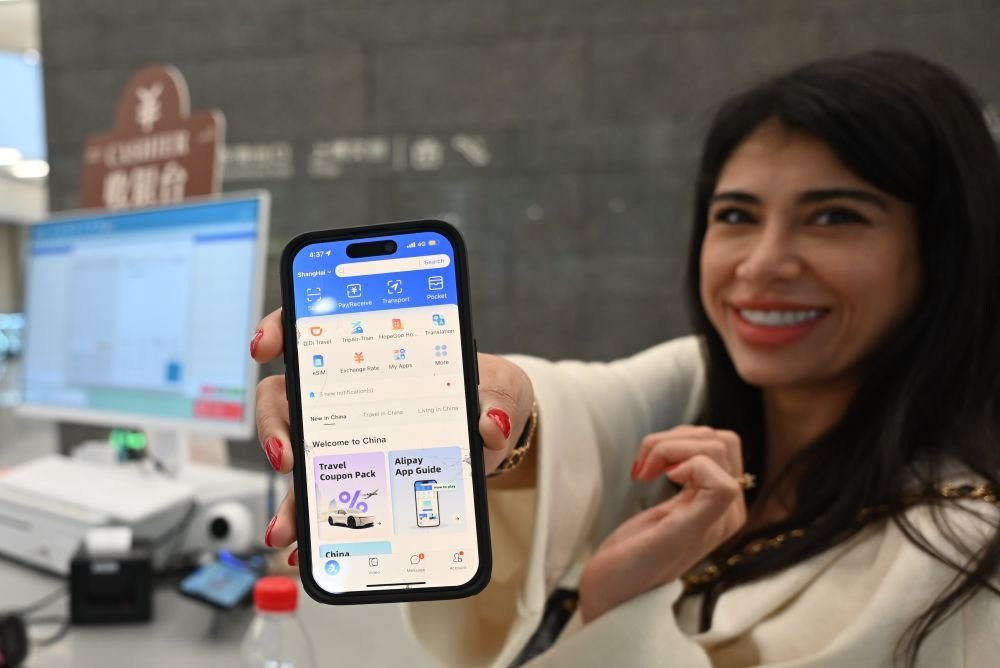
The two payment names to remember are Alipay (支付宝) and Weixin Pay (微信支付), the payment service inside WeChat. At a restaurant or shop you will commonly scan the merchant’s QR code, or let the cashier scan your payment code. Prepare one working wallet before departure, set up the other if possible, and carry renminbi cash and a physical bank card as backups.
Link your card in Alipay
- Install the official Alipay app and register using your mobile number, including the correct country code. An overseas number can be used; make sure it receives the verification message.
- Choose an available interface language you understand. Open Me → Bank Cards, then select the option to add a card. Menu wording may vary slightly with the version.
- Enter the card details the app requests. Use an eligible card issued in your own name; Visa and Mastercard are familiar starting points, with additional networks shown by the service. The issuing bank and card product still affect eligibility.
- Complete passport or other identity verification when requested, and finish any bank authentication. Set the payment password or other confirmation method requested by the app.
- Check that the card appears in your account. At the first merchant payment, confirm that the intended card is selected, inspect any fee, and verify that the transaction completes.
A linked overseas card is generally charged when you make an eligible merchant purchase. Linking it does not mean you can transfer money to anyone, receive every kind of payment, or top up the wallet balance. Do not look for an unofficial person to sell you a payment balance.
Activate Weixin Pay inside WeChat
- Install or update WeChat, register or sign in, and complete any registration checks. WeChat messaging registration is not the same as payment verification.
- Go to Me → Services → Wallet → Bank Cards. Depending on the account and language, Services may appear as Pay and Services. Follow the add-card option.
- Enter your eligible international card information and provide passport identity details when requested. The identity and card holder information must be consistent.
- Finish verification and the payment-password setup. Confirm the added card in the wallet before depending on it for your first taxi or meal.
Weixin Pay supports several international networks, including Visa, Mastercard, American Express, JCB, Discover, and Diners Club. Support for a network does not guarantee that every issued card or account will pass verification. An overseas-card wallet is primarily useful for merchant purchases; person-to-person transfers and red packets may require different eligibility.
At the counter: who scans whom?
| Situation | What you do | What to check |
|---|---|---|
| The merchant has a QR code on the counter | In Alipay, tap Scan. In WeChat, use + → Scan. Scan the merchant code, enter the amount if needed, choose the payment source, and approve. | Read the merchant name and amount. A personal transfer code may not work with your international card. |
| The cashier holds a scanner | In Alipay, open your Pay/payment code. In WeChat, open Money/payment code under the payment service. Let the cashier scan your code. | Show a payment code, not the QR code used to add you as a WeChat contact. Verify the completed transaction. |
| A restaurant asks you to scan a table code | Scan it to open the ordering mini program, choose your dishes, then inspect the checkout. | An ordering QR code is not necessarily a direct payment QR code. The final payment still needs approval or an authorized payment arrangement. |
A sound or a green screen is not the only thing to watch: check the transaction record and the merchant’s confirmation. If the screen is slow, inspect the order before paying again. Keep your payment code private and approve a charge only after checking the total.
Service fees and what a card link cannot do
For international-card wallet payments, a purchase of more than RMB 200 may attract a 3% platform fee on the full amount. That would be RMB 9 on a RMB 300 payment when the standard fee applies. Promotional waivers can change the result: Tencent announced a first-time-user waiver for eligible Weixin Pay users in 2026. Use the fee shown for your account and transaction rather than assuming every visitor pays the same amount.
Your bank can separately charge foreign-transaction or currency-conversion fees. The price on the restaurant menu is in renminbi, and a wallet fee is different from your bank’s fee. Review your bank’s overseas-payment settings and keep its contact details accessible.
Cash and physical cards still belong in the plan
Bring some renminbi in manageable denominations. For an ordinary cash purchase, give the cashier the banknotes, confirm the change, and collect your receipt where needed. Cash is legal tender in mainland China; a QR-payment habit does not make it obsolete. Purely online services still require a workable digital arrangement, so cash does not solve every app booking.
Withdraw renminbi at a bank ATM displaying your card network’s logo, or exchange money through an authorized bank or exchange service. Check withdrawal limits and displayed fees; carry the original passport if using a bank service that requires identification. Direct card acceptance is more common in larger hotels and established businesses than at a small food stall, so ask before ordering a costly service.
If a payment fails, try a different route
- Confirm the selected card, internet connection, completed identity checks, and any bank authentication request.
- Ask whether the merchant has a business payment code supported by your wallet, instead of a personal transfer code.
- Try the other prepared wallet or a physical card if the business accepts it; for an in-person purchase, offer cash.
- If money appears deducted but the order failed, keep the transaction record and use the app’s official help channel before repeating the charge.
Practical guidance reviewed 12 October 2026. Confirm current rules, opening arrangements, and availability with the relevant authority or provider before travel.
← Back to Travel Tips